


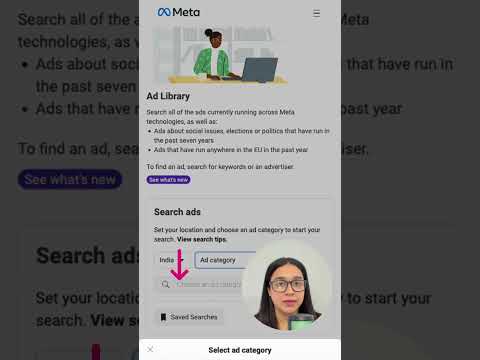
The digital advertising landscape has evolved dramatically over the past decade, and with that evolution came a growing need for transparency. Whether you are a marketer researching competitor strategies, a journalist investigating political campaigns, or a consumer curious about why a particular ad follows you across the internet, the ads library has become an indispensable tool. In this comprehensive guide, we will explore everything about the ads library, how it works, why it matters, and how you can leverage it to gain a competitive advantage in 2024 and beyond.
What Is an Ads Library and Why Does It Matter?
An ads library is a publicly accessible database that stores and displays active advertisements running on major digital platforms. Think of it as a transparent window into the advertising ecosystem. The most prominent examples include Meta’s Ad Library (covering Facebook, Instagram, Messenger, and Audience Network) and Google’s Ads Transparency Center (covering YouTube, Google Search, and Display Network). These repositories allow anyone to search for advertisements by keyword, advertiser name, or topic, and view the creative assets, targeting parameters, and spending information associated with each ad.
The importance of ads libraries cannot be overstated. They serve multiple purposes across different audiences. For digital marketers, they are a goldmine of competitive intelligence. For journalists and researchers, they provide verifiable evidence of ad campaigns, especially during election periods. For regulators and policymakers, they offer a mechanism to enforce advertising compliance and monitor potentially harmful content. And for everyday users, they demystify the ad targeting mechanisms that shape our online experiences.
How the Meta Ads Library Works
Meta’s Ad Library, launched in 2019 and significantly expanded since then, is the most widely used ads library in the world. It archives ads that run on Facebook, Instagram, Messenger, and Audience Network. Here is a detailed breakdown of how it functions.
Search and Filtering Capabilities
The Meta Ad Library allows users to search advertisements using a variety of filters. You can look up ads by the advertiser’s name, search by keyword or topic, filter by the platform where the ad appears, and narrow results by the date range when the ad was active. The library also categorizes ads by topic, such as politics, social issues, elections, and religion, making it easier to find relevant campaigns.
What Information Is Available?
When you find an ad in the Meta Ad Library, you can access a wealth of information including:
- The ad creative itself — images, videos, carousels, and text content
- The advertiser’s name and page associated with the ad
- The date range during which the ad was active
- Estimated impressions and spending ranges (in some cases)
- Targeting details such as geographic location, language, and demographic filters
- The ad’s primary button and call-to-action text

Ad Library Policies and Review Process
Meta enforces strict policies around ads that run on its platforms. Every ad must comply with community standards and advertising policies. Ads related to sensitive topics such as politics and social issues go through an additional verification process where advertisers must confirm their identity and disclose their authorization. The ads library reflects these reviewed and approved ads, giving users confidence that the information displayed has been vetted by Meta’s review team.
Google’s Ads Transparency Center: A Complementary Resource
While Meta’s Ad Library focuses on social media advertising, Google’s Ads Transparency Center covers search ads, YouTube ads, and display ads across the Google Display Network. This center allows users to search for ads by advertiser name, keyword, or domain, and view details about the ad creative, landing pages, and targeting information. For businesses that run cross-platform campaigns, understanding both the ads library and the Google transparency tools is essential for a complete competitive analysis.
Why Digital Marketers Should Use the Ads Library
If you are a marketer or business owner, the ads library is one of the most powerful free research tools available. Here is why you should be using it regularly.
- Competitor Intelligence: You can see exactly what ads your competitors are running, what creative formats they prefer, which audiences they target, and how long their campaigns have been active.
- Creative Inspiration: Browse high-performing ad creatives across industries and adapt proven messaging frameworks, visual styles, and copywriting techniques for your own campaigns.
- Audience Insights: By analyzing the targeting parameters of competitor ads, you can uncover audience segments and interest categories that you may not have considered.
- Compliance Monitoring: Use the ads library to monitor whether competitors or industry peers are running ads that violate platform policies, which could present opportunities or inform your own compliance strategy.
- Trend Analysis: Track how ad creative, messaging, and targeting trends evolve over time within your niche by regularly searching the library and comparing results across different months.
Advanced Strategies for Using the Ads Library
Once you have mastered the basics, you can apply advanced techniques to extract even more value from the ads library. Consider these expert-level strategies.
Build a Competitive Ad Monitoring System
Instead of manually searching the ads library every week, set up a systematic monitoring process. Create a spreadsheet or use third-party tools like AdPlexity, Swydo, or SpyHero to track competitor ads over time. Document the ad format, copy, creative style, landing page, and targeting parameters for each ad you discover. Over time, this data becomes a powerful asset for your marketing strategy.
Analyze Ad Fatigue Signals
One subtle but valuable insight you can gain from the ads library is ad fatigue detection. When an advertiser has been running the same ad creative for an extended period, it often signals that the ad is still performing well or that the advertiser has not refreshed their creative assets. This is an opportunity for you to capture the same audience with fresher, more compelling creatives before your competitor does.
Cross-Reference with Third-Party Data
Combine insights from the ads library with other data sources. Pair ad creative analysis with traffic data from tools like SimilarWeb or Semrush, or correlate ad spend estimates with social media engagement metrics. This multi-layered approach gives you a much more complete picture of your competitors’ digital advertising strategies.
Leverage the Library for Audience Research
The ads library is not just about competitor ads — it is also a rich source of audience behavior data. Look at ads targeting niche interest groups, geographic markets, or professional segments that overlap with your target audience. Note the language, imagery, and offers that resonate with those segments, and use these insights to refine your own audience targeting.
Limitations and Challenges of the Ads Library
While the ads library is an incredibly valuable resource, it is important to understand its limitations. The data provided is not always complete or perfectly accurate. Meta, for instance, does not disclose exact ad spend figures or precise impression counts in all cases. Some ads may be archived or removed from the library if the advertiser pauses or ends a campaign. Additionally, ads that run outside the major platforms covered by these libraries are not captured, meaning there is a blind spot for ads on platforms like TikTok, Snapchat, or programmatic ad networks. Researchers and marketers should treat the ads library as a powerful supplementary tool rather than a definitive data source.
Comparison: Meta Ads Library vs. Google Ads Transparency Center

| Feature | Meta Ads Library | Google Ads Transparency Center |
| Platforms Covered | Facebook, Instagram, Messenger, Audience Network | Google Search, YouTube, Display Network |
| Search by Advertiser | Yes | Yes |
| Search by Keyword | Yes | Yes |
| Creative Assets Available | Images, videos, carousels, text | Text, images, video ads |
| Targeting Details | Yes (location, demographics, interests) | Limited targeting visibility |
| Political Ad Verification | Yes, verified advertiser identity | Yes, verified advertiser identity |
| Estimated Spend Data | Limited | Limited |
| Date Range Filtering | Yes | Yes |
Practical Tips for Getting the Most Out of the Ads Library
- Use broad keyword searches first, then narrow down by region and platform to find the most relevant ads for your analysis.
- Bookmark frequently searched advertisers so you can quickly check for new ads without repeating your search.
- Pay attention to ad variations — many advertisers run A/B tests with multiple creative versions simultaneously, and the library will show all of them.
- Check the “Ads Taken Down” section where available, as it can reveal which ads were removed for policy violations, offering insight into compliance boundaries.
- Combine ads library research with audience surveys or focus groups to validate whether the ad messaging you observe actually resonates with the target demographic.
Conclusion
The ads library has fundamentally changed how marketers, researchers, and everyday internet users understand digital advertising. It transforms opaque ad campaigns into transparent, searchable, and analyzable data points. Whether you are a small business owner looking to outperform local competitors, a researcher studying online advertising trends, or a curious consumer who wants to understand why certain ads follow you around the web, the ads library provides the visibility you need. By integrating ads library research into your regular marketing workflow and applying the advanced strategies outlined in this guide, you can unlock actionable insights that drive better campaign decisions, smarter budget allocation, and ultimately stronger return on ad spend.
FAQs
How do I access the Meta Ads Library?
You can access the Meta Ads Library directly at adslibrary.facebook.com. No account or login is required. Simply enter an advertiser name, keyword, or topic into the search bar and browse the results. The library is free to use and available to anyone with an internet connection.

Can I see exact ad spend numbers in the ads library?
No, neither Meta’s Ad Library nor Google’s Ads Transparency Center provides exact ad spend figures. They may show estimated ranges or spending tiers, but precise budget data is not publicly disclosed. For more detailed spend estimates, you would need to rely on third-party competitive intelligence tools.
Why do some ads disappear from the ads library?
Ads are removed from the library when they are paused, archived, or when the advertiser ends the campaign. Additionally, ads that violate platform policies may be taken down and removed from the library. The library archives ads that have been active within a reasonable recent timeframe, typically the last few years for most platforms.
Is the ads library useful for non-political advertising research?
Absolutely. While the ads library gained prominence for political ad transparency, it is equally valuable for commercial advertising research. You can study product launches, seasonal campaigns, promotional offers, and brand messaging across virtually every industry and niche using the library’s search and filtering tools.
Are TikTok and Snapchat ads included in the ads library?
No, currently neither TikTok nor Snapchat maintains a publicly accessible ads library comparable to Meta’s or Google’s. This represents a significant gap in ad transparency for these platforms. Researchers looking for data on ads running on these networks typically need to rely on manual screenshot collection or specialized third-party monitoring tools.