


Every digital marketer knows that first impressions in the inbox are everything. An email advertising template isn’t just a pretty layout—it’s the strategic foundation that determines whether your message gets opened, read, and acted upon. In an era where inboxes are overflowing and attention spans are razor-thin, having a well-crafted email ad template can mean the difference between a campaign that generates revenue and one that disappears into the void. Whether you’re a small business owner launching your first email campaign or a seasoned marketer refining your email advertising strategy, understanding how to build and optimize your email advertising template is absolutely critical to success.
What Is an Email Advertising Template and Why Does It Matter?
An email advertising template is a pre-designed structural framework that marketers use to create promotional emails at scale. Unlike a generic email newsletter template, an advertising-focused email template is purpose-built to highlight offers, drive conversions, and generate measurable responses from subscribers. These templates incorporate specific elements like call-to-action buttons, product showcases, discount codes, and urgency-driven messaging—all arranged in a layout optimized for engagement and click-through rates.
The importance of a professional email advertising template cannot be overstated. Research consistently shows that emails with well-designed templates achieve significantly higher open rates, click-through rates, and conversion rates compared to plain-text or poorly formatted alternatives. A strong template ensures brand consistency across campaigns, reduces design time, and allows teams to focus on strategy rather than starting from scratch every time.
Key Elements of a High-Converting Email Advertising Template
Building a high-performing email ad template requires attention to every structural component. Here are the essential elements that separate average templates from conversion machines:
- Compelling Subject Line Area: The preview text and subject line space within your email advertising template should work together to create curiosity and relevance, encouraging the subscriber to open the message.
- Hero Image or Banner: A visually striking hero section captures immediate attention and communicates the core offer within seconds of the email loading.
- Single Clear CTA: Every great promotional email template focuses on one primary call-to-action. Too many competing CTAs dilute the message and reduce conversion rates.
- Social Proof Section: Including testimonials, review counts, or trust badges within your email campaign template builds credibility instantly.
- Urgency and Scarcity Elements: Countdown timers, limited-stock indicators, and expiration dates create psychological urgency that drives faster action.
- Mobile-Responsive Layout: Over 60% of emails are opened on mobile devices, making responsive design non-negotiable in any modern email ad template.
- Footer with Unsubscribe Link: Compliance with CAN-SPAM and GDPR requires a clear unsubscribe option, and a clean footer builds long-term trust with your audience.
Types of Email Advertising Templates You Should Be Using
Not all email advertising templates serve the same purpose. Different campaign goals demand different structural approaches. Here are the most effective template types every marketer should have in their toolkit:
- Product Launch Email Template: Designed to build anticipation and excitement around a new product or service. These templates typically include teaser images, early-access offers, and countdown timers.
- Promotional Discount Template: Focused on driving immediate purchases through limited-time offers, coupon codes, and clear pricing visibility.
- Abandoned Cart Recovery Template: A highly specific email advertising template that targets users who left items in their cart, often including product images, pricing, and a direct link back to checkout.
- Seasonal Campaign Template: Tailored for holidays, back-to-school, Black Friday, or other time-sensitive events. These templates leverage thematic visuals and seasonal urgency.
- Re-engagement Email Template: Targets inactive subscribers with special offers or “we miss you” messaging designed to reactivate dormant email contacts.
- Nurture Sequence Template: A series of connected email ad templates that guide prospects through the sales funnel with educational content and progressive offers.
Choosing the Right Template Type for Your Campaign
The template you choose should align directly with your campaign objective. A product launch requires storytelling and anticipation, while a promotional discount template needs speed and clarity. Understanding your audience’s position in the buyer journey helps you select the most appropriate email advertising template for each situation.
Best Practices for Designing Effective Email Ad Templates
Designing an effective email advertising template goes far beyond choosing a pretty color scheme. Here are expert-level best practices that consistently deliver results:
- Keep your email template design above the fold—meaning the most critical content and CTA should be visible without scrolling.
- Use a single-column layout for mobile optimization. While multi-column designs look great on desktop, they often break on smaller screens.
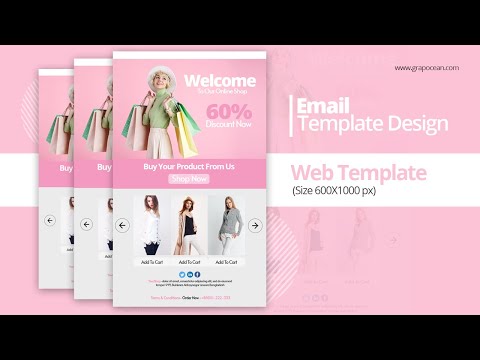
- Maintain a maximum width of 600 pixels for desktop compatibility across all email clients.
- Use alt text for every image, since many email clients block images by default.
- Test your email advertising template across at least five major email clients (Gmail, Outlook, Apple Mail, Yahoo, and Yahoo Mail) before sending.
- Limit your email template to three colors maximum to maintain visual coherence and brand recognition.
- Use bulletproof buttons for CTAs, as they render consistently across different platforms and devices.
- Keep copy concise—ideally under 200 words for a promotional email template—to maximize engagement from busy readers.
Comparison of Email Advertising Template Styles

Choosing between different template approaches depends on your brand, audience, and goals. The table below breaks down the key differences between popular email advertising template styles:
| Template Style | Best For | Design Complexity | Mobile Responsiveness | Conversion Potential |
| Single-Column Minimalist | Product launches, clean brand messaging | Low | Excellent | High |
| Multi-Column Grid Layout | Catalog showcases, product bundles | Medium | Moderate | Medium |
| Hero Image + Text Overlay | Promotional offers, event announcements | Medium | Good | Very High |
| Plain Text Template | Re-engagement, personal outreach | Low | Excellent | Moderate |
| Interactive Template (AMP) | Advanced engagement, surveys, polls | High | Variable | Very High (when supported) |
Advanced Tips for Maximizing Email Advertising Template Performance
Once you’ve mastered the basics of email advertising template design, it’s time to level up with advanced strategies that push performance beyond the ordinary:
Personalization Tokens Go Beyond the First Name. Modern email advertising templates support dynamic content blocks that change based on subscriber behavior, purchase history, or geographic location. A template that shows different product recommendations to different segments dramatically improves relevance and conversion rates.
A/B Test Every Element. Test subject lines within your email ad template, different hero images, button colors, copy lengths, and CTA placement. Even small changes—like moving your primary CTA from the top of the template to the bottom—can produce statistically significant differences in performance.
Leverage Segmentation Within Your Template Design. Create modular email advertising templates with swappable content blocks that can be customized per segment without rebuilding the entire layout. This approach saves enormous time while delivering highly personalized experiences.
Optimize for Deliverability. A beautifully designed email advertising template won’t help if it lands in the spam folder. Keep your HTML clean, avoid excessive image-to-text ratios, and always include a plain-text version of your email campaign template alongside the HTML design.
Analyze Post-Send Metrics Relentlessly. Track open rates, click-through rates, conversion rates, and revenue per email for every template variation. Use these insights to continuously refine and improve your email ad template library over time.
Frequently Asked Questions About Email Advertising Templates
What is the ideal size for an email advertising template?
The recommended maximum file size for an email ad template is 102 KB. Keeping your email advertising template under this threshold ensures faster loading times and reduces the likelihood of emails being clipped by Gmail or flagged by spam filters. Compress images, minimize inline CSS, and use clean HTML code to stay within this limit.
How often should I redesign my email advertising template?
There is no fixed rule, but most experts recommend refreshing your email campaign template every 6 to 12 months. If your click-through rates have declined steadily over several months, it may be time to revamp your email ad template design. Fresh visuals and updated layouts can reignite subscriber engagement without requiring a complete brand overhaul.
Can I use a free email advertising template and still get professional results?
Absolutely. Many free email advertising templates from reputable platforms like Mailchimp, Stripo, and Canva offer professional-grade designs that are fully customizable. The key is to ensure the template aligns with your brand identity, loads quickly, and includes all the essential conversion elements discussed in this article.
What email clients should I test my advertising email template on?
You should test your email advertising template on at least five platforms: Gmail (both desktop and mobile), Apple Mail, Outlook (2016 and newer), Yahoo Mail, and Samsung Mail. Using a testing tool like Litmus or Email on Acid gives you a comprehensive preview of how your email ad template renders across all major clients and devices.
How do I make my email advertising template accessible to all subscribers?
Accessibility in an email advertising template means using descriptive alt text for images, ensuring sufficient color contrast between text and backgrounds, using semantic HTML structure, and keeping font sizes at 14px or larger. These practices not only improve the experience for subscribers with disabilities but also signal professionalism and care to your entire audience.
Final Thoughts on Mastering the Email Advertising Template
The email advertising template is far more than a design asset—it is a strategic revenue tool that sits at the intersection of creativity, data, and psychology. By investing the time to build high-quality, well-tested email ad templates and continuously optimizing them based on real performance data, you set your campaigns up for sustained success. Start with a solid foundation, layer in advanced personalization and segmentation techniques, and never stop testing. The marketers who master the art and science of the email advertising template are the ones who consistently outperform their competitors in the crowded digital landscape.